
bert模型
3.3 Bert模型
Section titled “3.3 Bert模型”学习目标:
1.能够完成数据集的读取及预处理
2.理解dataSet、dataloader与collate_fn关系
3.能够完成Bert分类模型的构建
4.能够完成Bert模型的训练与测试
5.能够完成Bert分类模型的预测以及部署
Tips:
以下是transformer框架以及bert模型的架构。
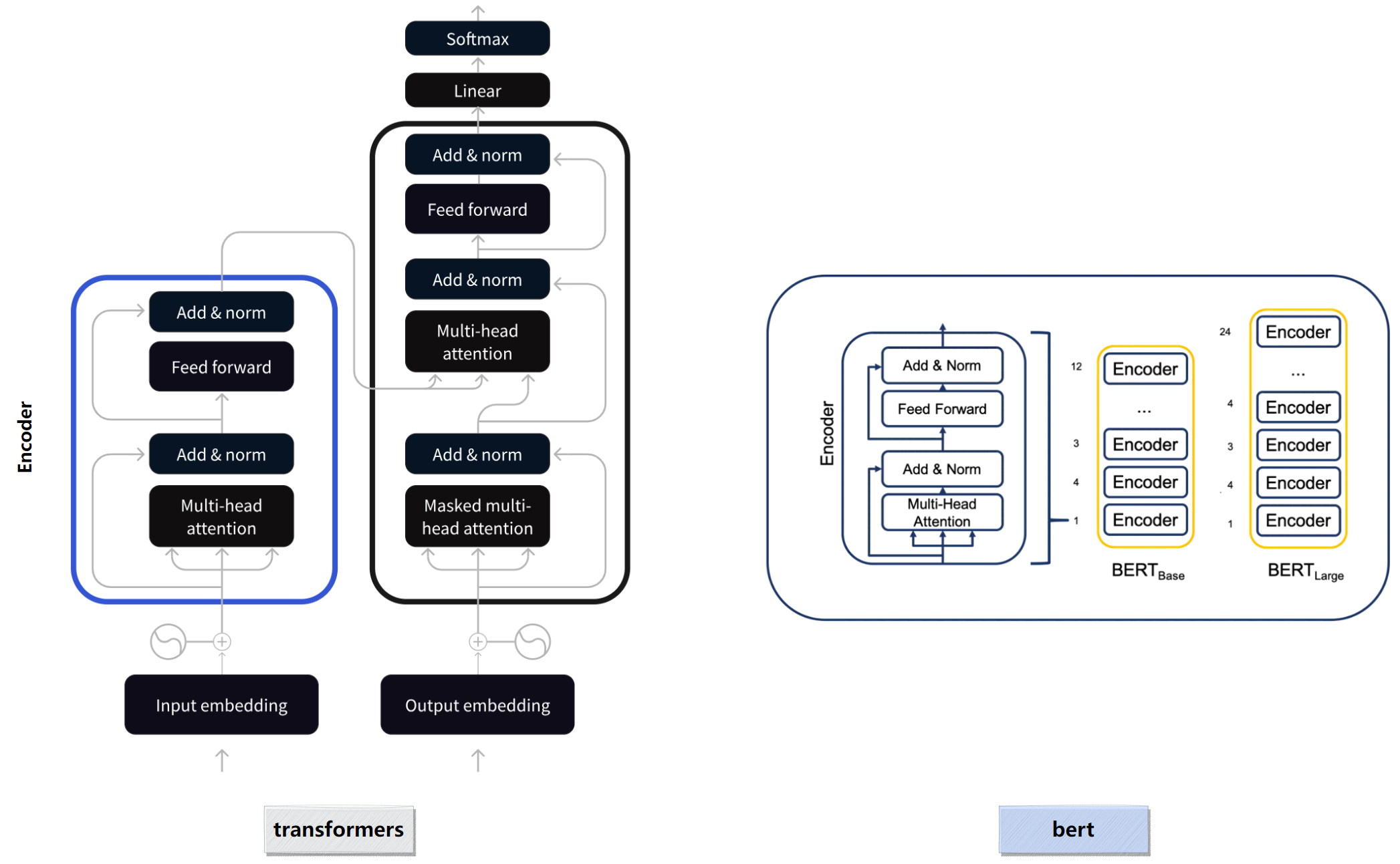
bert的模型结构:(输入维度 batch_size为2 )=========================================================================================================Layer (type:depth-idx) Output Shape Param #=========================================================================================================BertModel [2, 768] --├─BertEmbeddings: 1-1 [2, 128, 768] --│ └─Embedding: 2-1 [2, 128, 768] 16,226,304│ └─Embedding: 2-2 [2, 128, 768] 1,536│ └─Embedding: 2-3 [1, 128, 768] 393,216│ └─LayerNorm: 2-4 [2, 128, 768] 1,536│ └─Dropout: 2-5 [2, 128, 768] --├─BertEncoder: 1-2 [2, 128, 768] --│ └─ModuleList: 2-6 -- --│ │ └─BertLayer: 3-1 [2, 128, 768] 7,087,872│ │ └─BertLayer: 3-2 [2, 128, 768] 7,087,872│ │ └─BertLayer: 3-3 [2, 128, 768] 7,087,872│ │ └─BertLayer: 3-4 [2, 128, 768] 7,087,872│ │ └─BertLayer: 3-5 [2, 128, 768] 7,087,872│ │ └─BertLayer: 3-6 [2, 128, 768] 7,087,872│ │ └─BertLayer: 3-7 [2, 128, 768] 7,087,872│ │ └─BertLayer: 3-8 [2, 128, 768] 7,087,872│ │ └─BertLayer: 3-9 [2, 128, 768] 7,087,872│ │ └─BertLayer: 3-10 [2, 128, 768] 7,087,872│ │ └─BertLayer: 3-11 [2, 128, 768] 7,087,872│ │ └─BertLayer: 3-12 [2, 128, 768] 7,087,872├─BertPooler: 1-3 [2, 768] --│ └─Linear: 2-7 [2, 768] 590,592│ └─Tanh: 2-8 [2, 768] --=========================================================================================================- BertLayer 是 BERT 模型的核心组件,对应 Transformer 架构中的一个 encoder 层。
(一) 代码结构图
Section titled “(一) 代码结构图”代码位置:
TMFCode\04-bert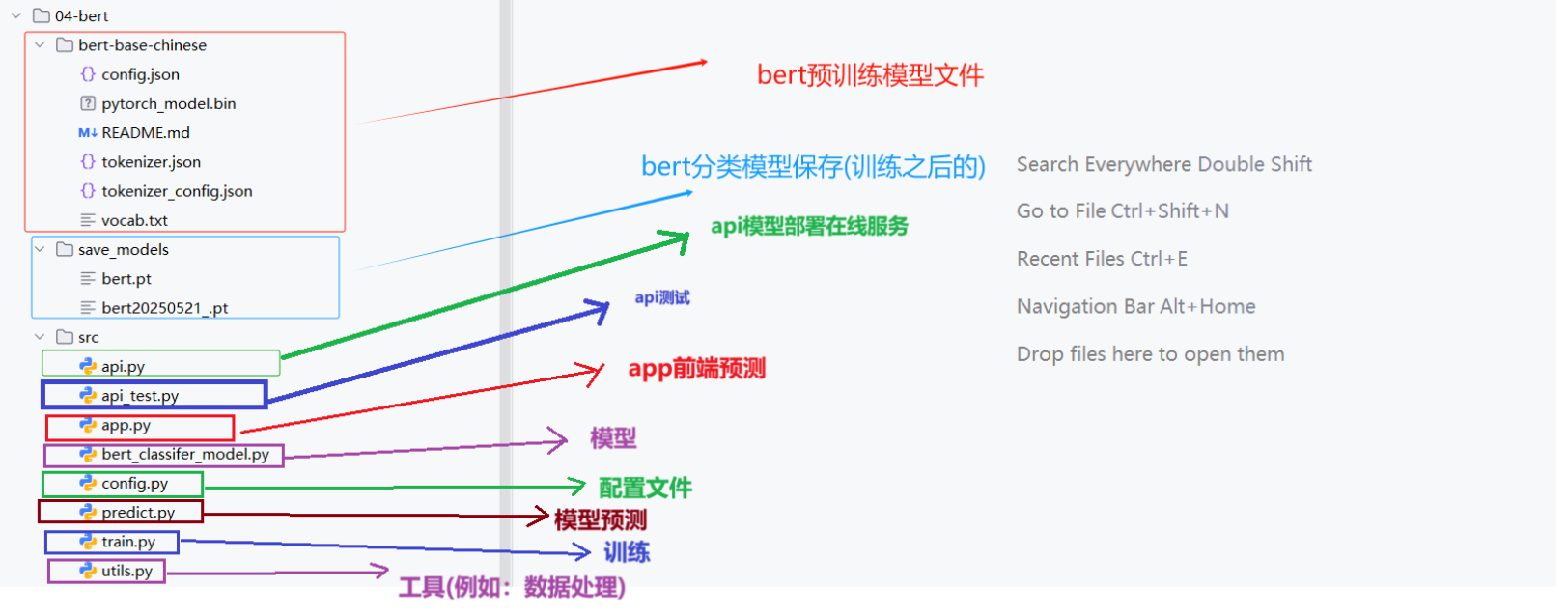
基于Bert进行分类建模思路:
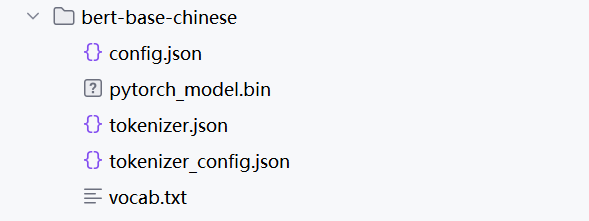
①下载bert预训练模型
目前bert的版本脚本,本次使用中文版的bert,bert下载
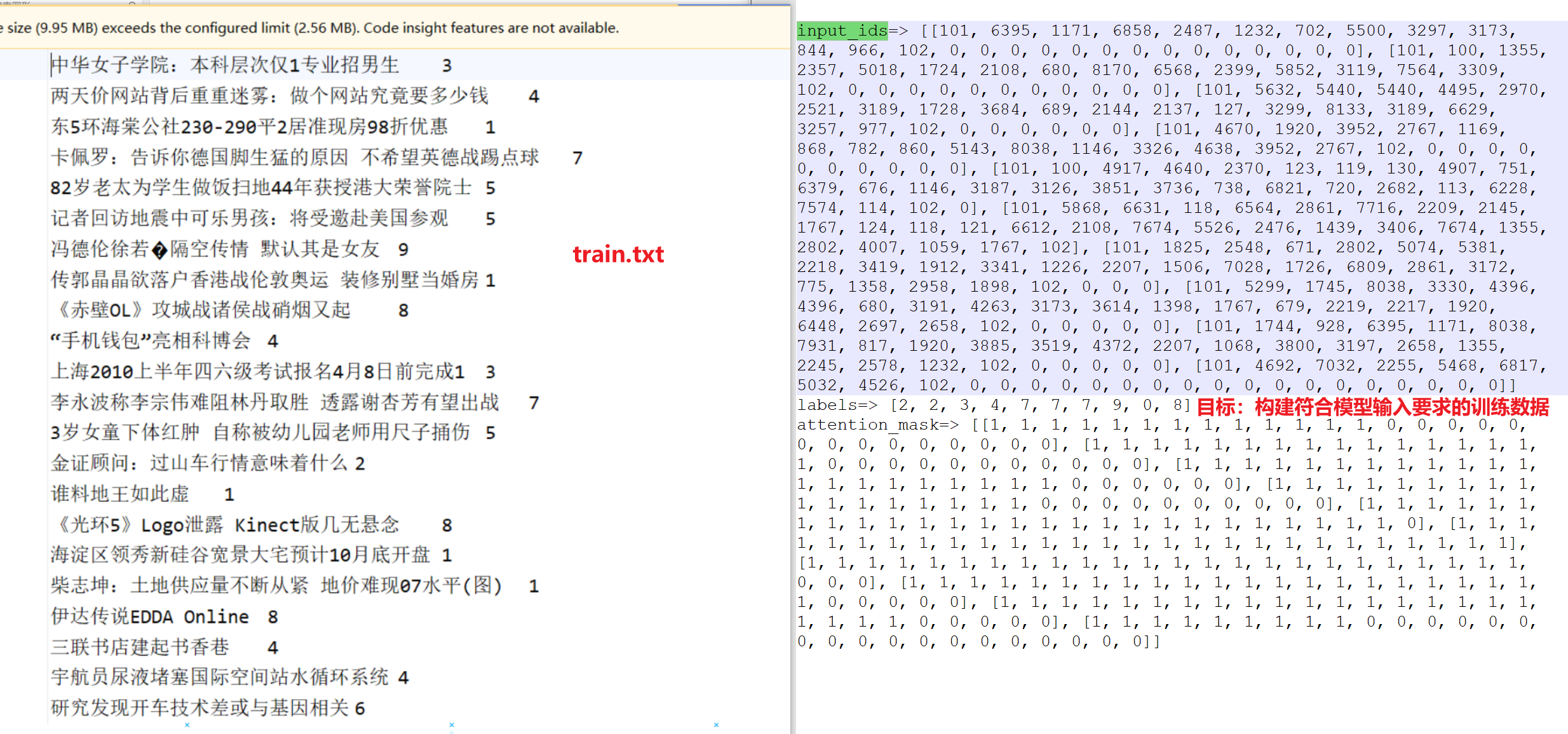
②构建数据处理脚本 对数据train.txt等相关样本文件进行处理,构建符合模型输入要求的训练数据。 处理脚本**:TMFCode\04-bert\src\utils.py**
③构建bert + 线性模块的 分类模型
Bert是一个预训练模型,所以我们可以基于bert模型本身加上一个线性分类层来构建我们的下游任务。
模型脚本:TMFCode\04-bert\src\bert_classifer_model.py
④构建训练脚本
⑤构建预测脚本
⑥构建模型部署、api测试脚本
(二) 代码实现
Section titled “(二) 代码实现”2.1 config配置文件
Section titled “2.1 config配置文件”代码位置:TMFCode\04-bert\src\config.py
import torchimport osimport datetimefrom transformers.models import BertModel,BertTokenizer,BertConfigcurrent_date=datetime.datetime.now().date().strftime("%Y%m%d")
class Config(object):    def __init__(self):        """        配置类,包含模型和训练所需的各种参数。        """        self.model_name = "bert" # 模型名称        self.data_path = "../../01-data"  #数据集的根路径        self.train_path = self.data_path + "\\train.txt"  # 训练集        self.dev_path = self.data_path + "\\dev3.txt"  # 少量验证集,快速验证        self.test_path = self.data_path + "\\test.txt"  # 测试集
        self.class_path=self.data_path + "\\class.txt" #类别文件
        self.class_list = [line.strip() for line in open(self.class_path, encoding="utf-8")]  # 类别名单
        self.model_save_path = "../save_models/test_bertclassifer_model.pt"  #模型训练结果保存路径
        # 模型训练+预测的时候        # 训练设备,如果GPU可用,则为cuda,否则为cpu        self.device = torch.device("cuda" if torch.cuda.is_available() else "cpu")
        self.num_classes = len(self.class_list)  # 类别数        self.num_epochs = 2  # epoch数        self.batch_size = 2  # mini-batch大小        self.pad_size = 32  # 每句话处理成的长度(短填长切)        self.learning_rate = 5e-5  # 学习率        self.bert_path = "../bert-base-chinese"  # 预训练BERT模型的路径        self.bert_model=BertModel.from_pretrained(self.bert_path)        self.tokenizer = BertTokenizer.from_pretrained(self.bert_path) # BERT模型的分词器        self.bert_config = BertConfig.from_pretrained(self.bert_path) # BERT模型的配置        self.hidden_size = 768 # BERT模型的隐藏层大小
if __name__ == '__main__':    conf = Config()    print(conf.bert_config)    input_size=conf.tokenizer.convert_tokens_to_ids(["你","好","中国","人"])    print(input_size)    print(conf.class_list)
2.2 utils配置文件
Section titled “2.2 utils配置文件”代码位置:TMFCode\04-bert\src\utils.py
utils脚本主要实现了train.txt相关数据读取加载切分,以及DataSet、DataLoader的构建,最终输出符合模型需求的数据格式。
导入工具和配置信息:
import torchfrom torch.utils.data import Dataset, DataLoaderfrom transformers import BertTokenizerfrom tqdm import tqdmimport timefrom datetime import timedeltafrom config import Configimport timeconf=Config()(1) 加载原始数据
Section titled “(1) 加载原始数据”读取原始数据train.txt等相关文件,进行切分之后,以元组的形式保存样本对到列表中。
train.txt处理为左侧的data列表:

def load_raw_data(file_path):    """    读取原始数据文件,解析为文本和标签。
    参数:        file_path (str): 数据文件路径(如dev2.txt)。
    返回:        List[Tuple[str, int]]: 包含(文本, 标签)的列表。    """    data = []    with open(file_path, "r", encoding="UTF-8") as f:        for line in tqdm(f, desc="Loading data"):            line = line.strip()            if not line:                continue            text, label = line.split("\t")            data.append((text, int(label)))    print(data[:5])    return data
(2) 构建自定义数据集
Section titled “(2) 构建自定义数据集”我们模型构建包括批计算都基于pytorch框架,所以我们数据要构建成符合pytorch模型需求的数据集。
class TextDataset(Dataset):    def __init__(self, data):        self.data = data
    def __len__(self):        return len(self.data)
    def __getitem__(self, idx):        x=self.data[idx][0]        y=self.data[idx][1]        return x, y
(3) 构建dataloader
Section titled “(3) 构建dataloader”构建dataloader用于后续建模中batch数据输入到模型中,进行loss的计算以及参数的迭代优化。
def build_dataloader():    """    构建DataLoader,整合数据加载、Dataset和collate_fn。
    参数:        file_path (str): 数据文件路径。        batch_size (int): 批次大小。        padding_size (int): 统一padding长度(默认28)。        device (str): 设备("cpu"或"cuda")。
    返回:        DataLoader: 用于训练的DataLoader。    """    # 加载原始数据    train_data = load_raw_data(conf.train_path)    test_data = load_raw_data(conf.test_path)    dev_data = load_raw_data(conf.dev_path)
    # 创建 Dataset    train_dataset = TextDataset(train_data)    dev_dataset = TextDataset(dev_data)    test_dataset = TextDataset(test_data)
    # 创建 DataLoader    train_dataloader = DataLoader(train_dataset,batch_size=conf.batch_size,shuffle=False,collate_fn=collate_fn)    test_dataloader = DataLoader(test_dataset, batch_size=conf.batch_size, shuffle=False, collate_fn=collate_fn)    dev_dataloader = DataLoader(dev_dataset, batch_size=conf.batch_size, shuffle=False, collate_fn=collate_fn)
    return train_dataloader,test_dataloader,dev_dataloader
(4) 构建collate_fn
Section titled “(4) 构建collate_fn”collate_fn是dataloader为了解决进入模型训练的数据不符合要求的进一步处理,例如batch级别数据处理长度、数据数值化等。
def collate_fn(batch):    """    DataLoader的collate_fn,处理分词、统一padding、mask生成和Tensor转换。
    参数:        batch (List[Tuple[str, int]]): 批次数据,包含(文本, 标签)。        tokenizer (BertTokenizer): BERT分词器。        padding_size (int): 统一padding长度(默认28,基于文本长度统计)。        device (str): 设备("cpu"或"cuda")。
    返回:        Tuple[torch.Tensor, ...]: (input_ids, seq_len, attention_mask, labels) 的Tensor格式。    """    # 提取文本和标签    texts = [item[0] for item in batch]    labels = [item[1] for item in batch]
    # 批量分词,自动添加 [CLS] 和 [SEP]  add_special_tokens  # padding,统一处理    text_tokens = conf.tokenizer.batch_encode_plus(texts,padding=True)    token_ids_list = text_tokens["input_ids"]    token_attention_mask_list = text_tokens["attention_mask"]    # 转为 Tensor    input_ids = torch.tensor(token_ids_list)    attention_mask = torch.tensor(token_attention_mask_list)    labels = torch.tensor(labels)    #    # print("================================")    # print(labels)    # print(attention_mask)    # print(input_ids)    return input_ids, attention_mask, labels
(5) 验证数据处理完整逻辑
Section titled “(5) 验证数据处理完整逻辑”if __name__ == "__main__": # 构建 DataLoader train_dataloader,test_dataloader,dev_dataloader = build_dataloader() # #遍历 DataLoader for batch in train_dataloader: input_ids, attention_mask, labels = batch print("input_ids=>",input_ids.tolist()) print("labels=>",labels.tolist()) print("attention_mask=>",attention_mask.tolist()) breakpoint()输入日志:
input_ids=> [[101, 704, 1290, 1957, 2094, 2110, 7368, 8038, 3315, 4906, 2231, 3613, 788, 122, 683, 689, 2875, 4511, 4495, 102, 0, 0, 0, 0], [101, 697, 1921, 817, 5381, 4991, 5520, 1400, 7028, 7028, 6837, 7443, 8038, 976, 702, 5381, 4991, 4955, 4994, 6206, 1914, 2208, 7178, 102]]labels=> [3, 4]attention_mask=> [[1, 1, 1, 1, 1, 1, 1, 1, 1, 1, 1, 1, 1, 1, 1, 1, 1, 1, 1, 1, 0, 0, 0, 0], [1, 1, 1, 1, 1, 1, 1, 1, 1, 1, 1, 1, 1, 1, 1, 1, 1, 1, 1, 1, 1, 1, 1, 1]]2.3 模型构建
Section titled “2.3 模型构建”代码位置:TMFCode\04-bert\src\bert_classifer_model.py
import torchimport torch.nn as nnfrom transformers import BertModelfrom config import Configfrom utils import build_dataloader
conf = Config()class BertClassifier(nn.Module):    """    BERT + 全连接层的分类模型。    """    def __init__(self):        """        初始化模型,包括BERT和全连接层。        """        super(BertClassifier, self).__init__()        self.bert = BertModel.from_pretrained(conf.bert_path)        self.fc = nn.Linear(conf.hidden_size, conf.num_classes)
    def forward(self, input_ids, attention_mask):        _, pooled = self.bert(input_ids=input_ids, attention_mask=attention_mask, return_dict=False)        out = self.fc(pooled)        return out
2.4 模型训练及验证
Section titled “2.4 模型训练及验证”代码位置:
TMFCode\04-bert\src\train.py导包以及相关配置:
import torchimport torch.nn as nnimport torch.optim as optimfrom torch.optim import AdamWfrom sklearn.metrics import classification_report, f1_score, accuracy_score, precision_scorefrom tqdm import tqdmimport osfrom config import Configfrom utils import build_dataloader, get_time_difffrom bert_classifer_model import BertClassifierimport time# 加载配置对象,包含模型参数、路径等conf = Config()# 忽略的警告信息import warningswarnings.filterwarnings("ignore")(1) 训练函数实现
Section titled “(1) 训练函数实现”def model2train(): """ 训练 BERT 分类模型并在验证集上评估,保存最佳模型。
参数: 无显式参数,所有配置通过全局 conf 对象获取。
返回: 无返回值,训练过程中保存最佳模型到指定路径。 """ # 1. 加载训练、测试和验证数据集的 DataLoader train_loader, test_loader, dev_loader = build_dataloader()
# 2. 定义训练参数,从配置对象中获取 device = conf.device # 设备("cuda" 或 "cpu") num_epochs = conf.num_epochs # 训练轮数
# 3. 初始化 BERT 分类模型 model = BertClassifier().to(device)
# 4. 定义优化器(AdamW,适合 Transformer 模型)和损失函数(交叉熵) optimizer = AdamW(model.parameters(), lr=conf.learning_rate) criterion = nn.CrossEntropyLoss()
# 5. 初始化最佳验证 F1 分数,用于保存性能最好的模型 best_dev_f1 = 0.0
# 6. 遍历每个训练轮次(epoch) for epoch in range(num_epochs): # 设置模型为训练模式(启用 dropout 和 batch norm) model.train() total_loss = 0 # 累计训练损失 train_preds, train_labels = [], [] # 存储训练集预测和真实标签
# 7. 遍历训练 DataLoader 进行模型训练 for batch in tqdm(train_loader, desc=f"Bert Classifier Training Epoch {epoch + 1}/{num_epochs}...."): # 7.0 提取批次数据并移动到设备 input_ids, attention_mask, labels = batch input_ids, attention_mask, labels = input_ids.to(device), attention_mask.to(device), labels.to(device)
# 7.1 前向传播:模型预测 logits = model(input_ids, attention_mask) # 7.2 损失计算 loss = criterion(logits, labels) # 7.3 梯度归零 optimizer.zero_grad() # 7.4 反向传播 loss.backward() # 7.5 参数更新 optimizer.step()
# 7.6 累计损失 total_loss += loss.item() # 7.7 获取预测结果(最大 logits 对应的类别) preds = torch.argmax(logits, dim=1) # 7.8 存储预测和真实标签,用于计算训练集指标 train_preds.extend(preds.tolist()) train_labels.extend(labels.tolist())
# 7.9 打印训练信息并评估验证集 print(f"Epoch {epoch + 1}/{num_epochs}") print(f"Train Loss: {total_loss / len(train_loader):.4f}") # 在验证集上评估模型 report, f1score, accuracy, precision = model2dev(model, dev_loader, device) print(f"Dev F1: {f1score:.4f}") print(f"Dev Accuracy: {accuracy:.4f}")
# 7.10 如果验证 F1 分数优于历史最佳,保存模型 if f1score > best_dev_f1: best_dev_f1 = f1score torch.save(model.state_dict(), conf.model_save_path) print("模型保存!!")
# 7.11 计算并打印训练集的分类报告 train_report = classification_report(train_labels, train_preds, target_names=conf.class_list, output_dict=True) print(train_report)(2) 验证函数实现
Section titled “(2) 验证函数实现”def model2dev(model, data_loader, device): """ 在验证或测试集上评估 BERT 分类模型的性能。
参数: model (nn.Module): BERT 分类模型。 data_loader (DataLoader): 数据加载器(验证或测试集)。 device (str): 设备("cuda" 或 "cpu")。
返回: tuple: (分类报告, F1 分数, 准确度, 精确度) - report: 分类报告(包含每个类别的精确度、召回率、F1 分数等)。 - f1score: 微平均 F1 分数。 - accuracy: 准确度。 - precision: 微平均精确度。 """ # 1. 设置模型为评估模式(禁用 dropout 和 batch norm) model.eval()
# 2. 初始化列表,存储预测结果和真实标签 preds, true_labels = [], []
# 3. 禁用梯度计算以提高效率并减少内存占用 with torch.no_grad(): # 4. 遍历数据加载器,逐批次进行预测 for batch in tqdm(data_loader, desc="Bert Classifier Evaluating ......"): # 4.1 提取批次数据并移动到设备 input_ids, attention_mask, labels = batch input_ids, attention_mask, labels = input_ids.to(device), attention_mask.to(device), labels.to(device)
# 4.2 前向传播:模型预测 logits = model(input_ids, attention_mask)
# 4.3 获取预测结果(最大 logits 对应的类别) batch_preds = torch.argmax(logits, dim=1)
# 4.4 存储预测和真实标签 preds.extend(batch_preds.cpu().numpy()) true_labels.extend(labels.cpu().numpy())
# 5. 计算分类报告、F1 分数、准确度和精确度 report = classification_report(true_labels, preds) f1score = f1_score(true_labels, preds, average='micro') # 使用微平均计算 F1 分数 accuracy = accuracy_score(true_labels, preds) # 计算准确度 precision = precision_score(true_labels, preds, average='micro') # 使用微平均计算精确度
# 6. 返回评估结果 return report, f1score, accuracy, precision(3) 日志效果
Section titled “(3) 日志效果”if __name__ == '__main__': # 主程序入口 model2train()
# 1. 加载测试集数据 train_dataloader, test_dataloader, dev_dataloader = build_dataloader() # 2. 初始化 BERT 分类模型 model = BertClassifier() # 3. 加载预训练模型权重 model.load_state_dict(torch.load("../save_models/bert20250521_.pt")) # 4. 将模型移动到指定设备 model.to(conf.device) # 5. 在测试集上评估模型 test_report, f1score, accuracy, precision = model2dev(model, test_dataloader, conf.device) # 6. 打印测试集评估结果 print("Test Set Evaluation:") print(f"Test F1: {f1score:.4f}") print("Test Classification Report:") print(test_report)输出日志:
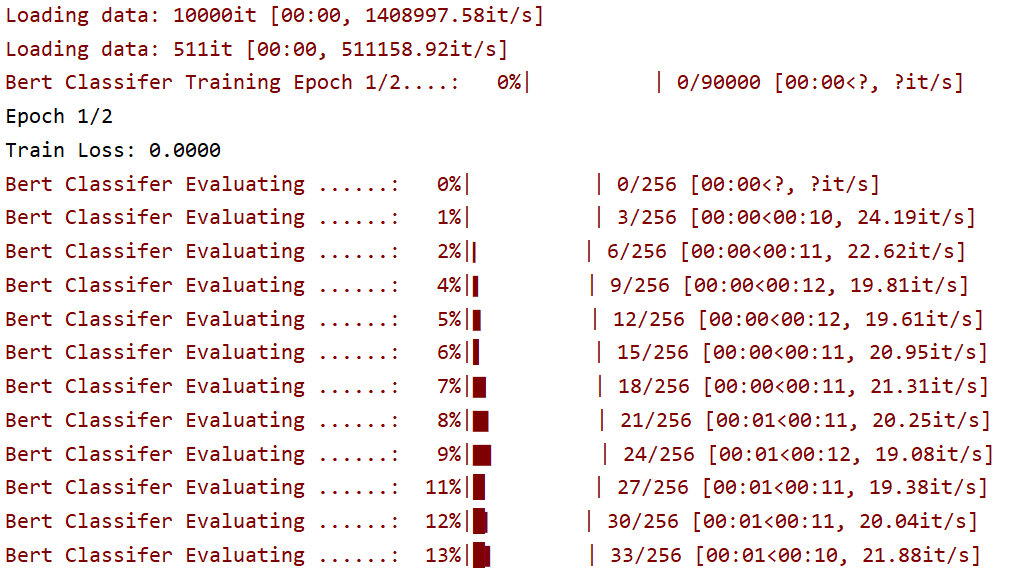
Bert Classifier Evaluating ......:   0%|          | 0/2 [00:00<?, ?it/s]Epoch 2/2Train Loss: 0.0107
Bert Classifier Evaluating ......:  50%|█████     | 1/2 [00:00<00:00,  9.22it/s]Bert Classifier Evaluating ......: 100%|██████████| 2/2 [00:00<00:00,  9.09it/s]Bert Classifier Training Epoch 2/2....:   5%|▌         | 38/704 [00:18<05:32,  2.01it/s]Dev F1: 0.9276Dev Accuracy: 0.9276
..........Epoch 2/2Train Loss: 0.0042
Bert Classifier Evaluating ......:   0%|          | 0/2 [00:00<?, ?it/s]Bert Classifier Evaluating ......:  50%|█████     | 1/2 [00:00<00:00,  9.75it/s]Bert Classifier Evaluating ......: 100%|██████████| 2/2 [00:00<00:00,  9.62it/s]Bert Classifier Training Epoch 2/2....:   100%|██████████| 704/704Dev F1: 0.9364Dev Accuracy: 0.9364
结论: 采用BERT预训练模型的验证集测试 F1和Acc能达到93.17%,效果显著。
2.5 预测脚本
Section titled “2.5 预测脚本”代码位置:
TMFCode\04-bert\src\predict_fun.py导入工具及相关配置、加载模型:
import torchfrom transformers import BertTokenizerfrom bert_classifer_model import BertClassifierfrom config import Config# 初始化配置conf = Config()
device = conf.devicetokenizer = conf.tokenizermodel = BertClassifier().to(device)model.load_state_dict(torch.load("../save_models/bert20250521_.pt"))model.eval()
以下为预测函数:
#预测函数def predict(data):    # 1.获取数据 data['text']    text = data['text']
    # 2.预处理数据----text===> input_ids,attention_mask <=== tokenizer.encode_plus    tokenize = tokenizer.encode_plus(text, return_tensors='pt')    input_ids = tokenize['input_ids'].to(device)    attention_mask = tokenize['attention_mask'].to(device)
    # 3.模型预测    ## 3.1 关闭梯度计算    with torch.no_grad():        ## 3.2 前向推理 model()        pred_logits = model(input_ids, attention_mask)        ## 3.3 获取预测结果---softmax  argmax(最大概率值所对应的索引)  class_name        pred_prob = torch.softmax(pred_logits, dim=1)        pred_ids = torch.argmax(pred_prob, dim=1)        pred_class = conf.class_list[pred_ids]
    return {"text": text, "pred_class": pred_class}
输入日志:
预测结果:{'text': '中华女子学院:本科层次仅1专业招男生', 'pred_class': 'education'}2.6 模型部署
Section titled “2.6 模型部署”(1) 服务端
Section titled “(1) 服务端”# 模型部署import fasttextimport jiebafrom predict_fun import predictfrom flask import Flask, request,jsonify
app = Flask(__name__)
@app.route('/predict', methods=['POST'])def predict_api(): # 获取请求数据 data = request.get_json() #预测 print("-------------预测结果------------") result=predict(data) print(result) return jsonify(result)
if __name__ == '__main__': app.run(host='0.0.0.0',port=8003)启动日志:
C:\python.exe C:\TMFCode\04-bert\src\api.py * Serving Flask app 'api' * Debug mode: offWARNING: This is a development server. Do not use it in a production deployment. Use a production WSGI server instead. * Running on all addresses (0.0.0.0) * Running on http://127.0.0.1:8003 * Running on http://26.26.26.1:8003(2) 客户端
Section titled “(2) 客户端”import requestsimport time# 定义预测接口地址url = 'http://127.0.0.1:8003/predict'
# 构造请求数据data = {'text': "中华女子学院:本科层次仅1专业招男生"}# 记录开始时间start_time = time.time()# 发送 POST 请求try: response = requests.post(url, json=data) # 计算耗时(毫秒) elapsed_time = (time.time() - start_time) * 1000 print(f"请求耗时: {elapsed_time:.2f} ms")
# 检查响应状态 if response.status_code == 200: result = response.json() print(f"预测结果: {result['pred_class']}") else: print(f"请求失败: {response.status_code}, {response.json()['error']}")except Exception as e: print(f"请求出错: {str(e)}")输出日志:
C:\python.exe C:\TMFCode\04-bert\src\api_test.py请求耗时: 60.96 ms预测结果: education2.7 前端预测
Section titled “2.7 前端预测”代码位置:TMFCode\04-bert\src\app.py
启动命令:
streamlit run app.py --server.port 8504