
LangChain + ChatGLM 实现本地知识库问答
4.2 LangChain+ChatGLM-6B实现本地知识库问答
Section titled “4.2 LangChain+ChatGLM-6B实现本地知识库问答”基于LangChain + ChatGLM 搭建融合本地知识的问答机器人
Section titled “基于LangChain + ChatGLM 搭建融合本地知识的问答机器人”- 了解项目开发背景
- 掌握融合本地知识的问答机器人实现过程
1 背景介绍
Section titled “1 背景介绍”近半年以来,随着ChatGPT的火爆,使得LLM成为研究和应用的热点,但是市面上大部分LLM都存在一个共同的问题:模型都是基于过去的经验数据进行训练完成,无法获取最新的知识,以及各企业私有的知识。因此很多企业为了处理私有的知识,主要借助一下两种手段来实现:
- 利用企业私有知识,基于开源大模型进行微调
- 基于LangChain集成向量数据库以及LLM搭建本地知识库的问答(RAG)
在本章之前我们已经掌握了基于大模型的prompt微调方式。因此,本章节我们将基于LangChain+ChatGLM搭建本地知识的问答机器人系统。该系统需要能够根据用户提供的问题,在本地的知识库(离线)中查找并返回相关答案。
本次项目以”某东商品衣服”为例,以衣服属性构建本地知识,测试问答效果。使用者可以自由更新本地知识,用户问题的答案也是基于本地知识生成的。
2 项目介绍
Section titled “2 项目介绍”该项目的基本原理:
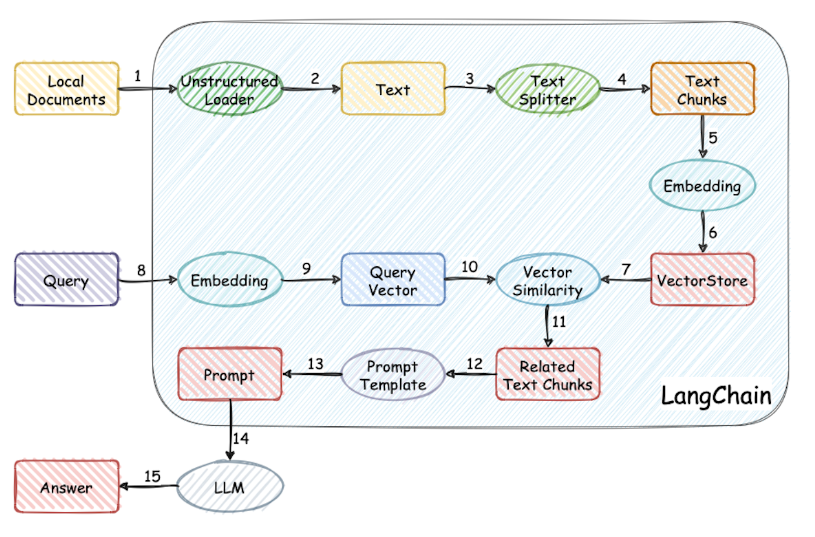
其过程描述:
- 加载文件
- 读取文件
- 文本分割
- 文本向量化
- 问句向量化
- 在文本向量中匹配出与问句向量相似的top_k个
- 匹配出的文本作为上下文和问题一起添加到prompt中
- 提交给LLM生成答案
该问答机器人的主要功能包括:
- 基于本地知识库的问答:系统可以根据用户的提问,在本地的知识库中进行搜索,并返回相关的答案。
- 多模型支持:项目支持使用不同的语言模型,可以根据需求选择合适的模型进行使用。
- 离线私有化:可以将该问答系统部署在本地环境中,确保数据的安全性和隐私性。
3 项目流程
Section titled “3 项目流程”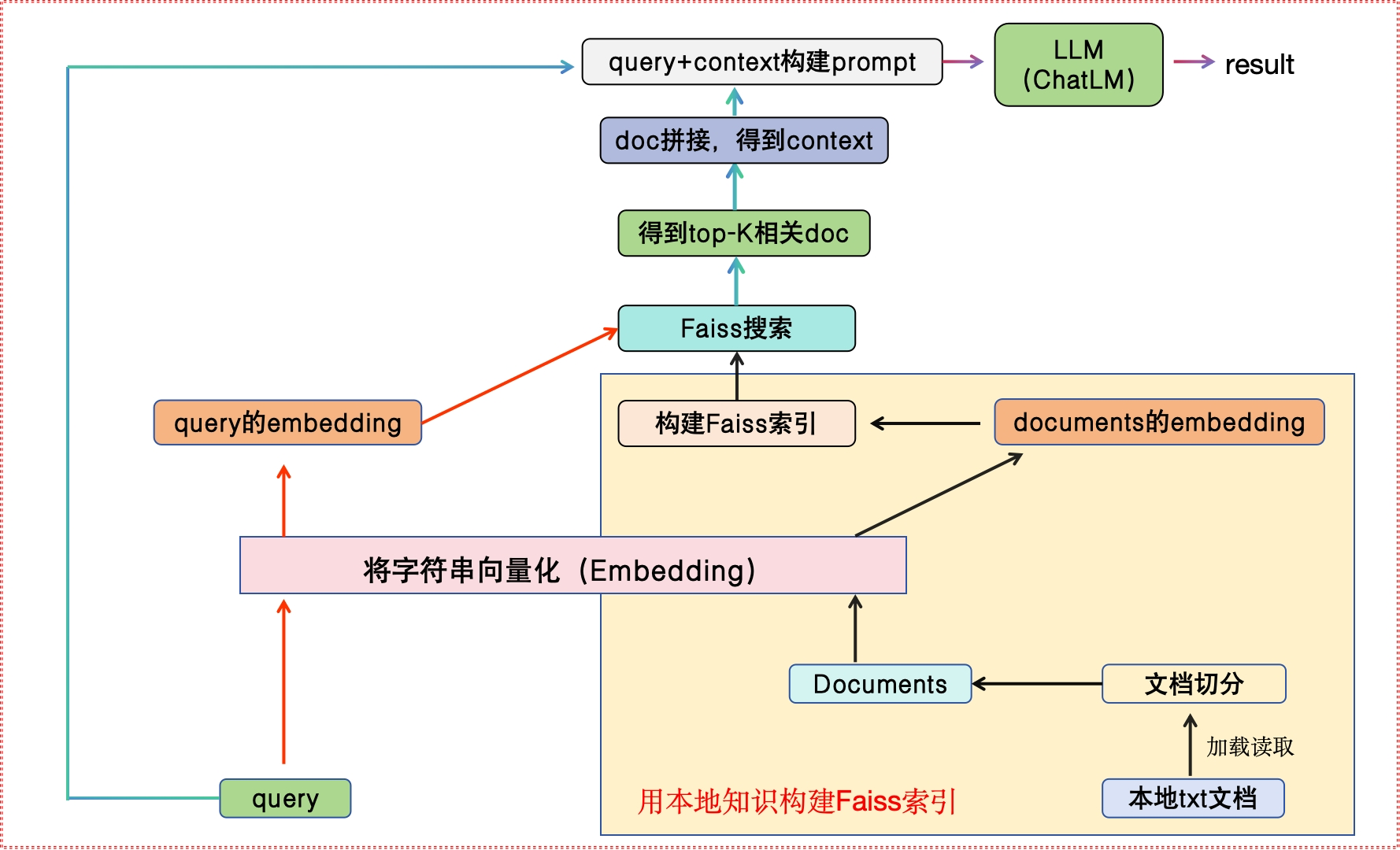
4 环境配置
Section titled “4 环境配置”4.1 安装依赖
Section titled “4.1 安装依赖”- 首先,确保你的机器安装了Python3.8-Python3.11
# 终端查看python的版本python --version- 紧接着安装项目的依赖
# 安装全部依赖pip install faiss-cpupip install langchainpip install qianfan4.2 模型下载
Section titled “4.2 模型下载”如需在本地或离线环境下运行本项目,需要首先将项目所需的模型下载至本地,通常开源 LLM 与 Embedding 模型可以从 HuggingFace 下载。
本项目中默认使用的 LLM 模型 THUDM/ChatGLM-6B 与 Embedding 模型 moka-ai/m3e-base
5 代码实现
Section titled “5 代码实现”5.1 自定义GLM类
Section titled “5.1 自定义GLM类”-
目的:使用LLMs模块封装ChatGLM,load本地模型。使用LLM模块封装我们的模型接口的一个好处是有利于后续跟LangChain的其他模块协同。
-
代码路径:/Users/**/PycharmProjects/llm/langchain_apply/Knowledge_QA/model.py
-
具体代码
-
导入必备的工具包
from langchain.llms.base import LLMfrom langchain.llms.utils import enforce_stop_tokensfrom transformers import AutoTokenizer, AutoModelfrom typing import List, Optional- 自定义GLM类
# 自定义ChatGLM2class ChatGLM2(LLM):    max_token: int = 4096    temperature: float = 0.8    top_p = 0.9    tokenizer: object = None    model: object = None    history = []
    def __init__(self):        super().__init__()
    @property    def _llm_type(self) -> str:        return "ChatGLM2"
    # 定义load_model方法,进行模型的加载    def load_model(self, model_path=None):        self.tokenizer = AutoTokenizer.from_pretrained(model_path, trust_remote_code=True)        self.model = AutoModel.from_pretrained(model_path, trust_remote_code=True).float()
    # 实现_call方法,进行模型的推理    def _call(self, prompt: str, stop: Optional[List[str]] = None) -> str:        response, _ = self.model.chat(            self.tokenizer,            prompt,            history=self.history,            max_length=self.max_token,            temperature=self.temperature,            top_p=self.top_p)        if stop is not None:            response = enforce_stop_tokens(response, stop)        self.history = self.history + [[None, response]]        return response
5.2 构建Faiss索引
Section titled “5.2 构建Faiss索引”-
目的:构建向量库
-
代码位置:/Users/**/PycharmProjects/llm/langchain_apply/Knowledge_QA/get_vector.py
-
具体代码
-
导入必备的工具包
from langchain.document_loaders import UnstructuredFileLoaderfrom langchain.text_splitter import RecursiveCharacterTextSplitterfrom langchain.embeddings.huggingface import HuggingFaceEmbeddingsfrom langchain.vectorstores import FAISS # 向量数据库- 定义main()方法
def main():    # 定义向量模型路径    EMBEDDING_MODEL = "moka-ai/m3e-base"
    # 第一步:加载文档    loader = UnstructuredFileLoader("衣服属性.txt")    # 将文本转成 Document 对象    data = loader.load()    print(f'documents:{len(data)}')
    # 第二部:切分文本    text_splitter = RecursiveCharacterTextSplitter(chunk_size=100, chunk_overlap=0)    # 切割加载的 document    split_docs = text_splitter.split_documents(data)    # print("split_docs size:",len(split_docs))    # print(split_docs)

    # 第三步:初始化 hugginFace 的 embeddings 对象    embeddings = HuggingFaceEmbeddings(model_name=EMBEDDING_MODEL)
    # 第四步:将 document通过embeddings对象计算得到向量信息并永久存入FAISS向量数据库,用于后续匹配查询    db = FAISS.from_documents(split_docs, embeddings)    db.save_local("./faiss/product")
    return split_docs
result = main()print(result)
5.3 实现QA本地知识库问答
Section titled “5.3 实现QA本地知识库问答”- 代码路径:/Users/ligang/PycharmProjects/llm/langchain_apply/Knowledge_QA/main.py
- 代码实现
# coding:utf-8# 导入必备的工具包from langchain import PromptTemplatefrom get_vector import *from model import ChatGLM2# 加载FAISS向量库EMBEDDING_MODEL = "moka-ai/m3e-base"embeddings = HuggingFaceEmbeddings(model_name=EMBEDDING_MODEL)db = FAISS.load_local("faiss/product",embeddings)

def get_related_content(related_docs):    related_content = []    for doc in related_docs:        related_content.append(doc.page_content.replace("\n\n", "\n"))    return "\n".join(related_content)
def define_prompt():    question = '我身高170,体重140斤,买多大尺码'    docs = db.similarity_search(question, k=1)    related_content = get_related_content(docs)
    PROMPT_TEMPLATE = """        基于以下已知信息,简洁和专业的来回答用户的问题。不允许在答案中添加编造成分。        已知内容:        {context}        问题:        {question}"""
    prompt = PromptTemplate(        input_variables=["context", "question"],        template=PROMPT_TEMPLATE,)
    my_pmt = prompt.format(context=related_content,                        question=question)
    return my_pmt
def qa():    llm = ChatGLM2()    llm.load_model("/Users/**/PycharmProjects/llm/ChatGLM-6B/THUDM/chatglm-6b")    my_pmt = define_prompt()    result = llm(my_pmt)    return result

if __name__ == '__main__': result = qa() print(result)- 结果展示:
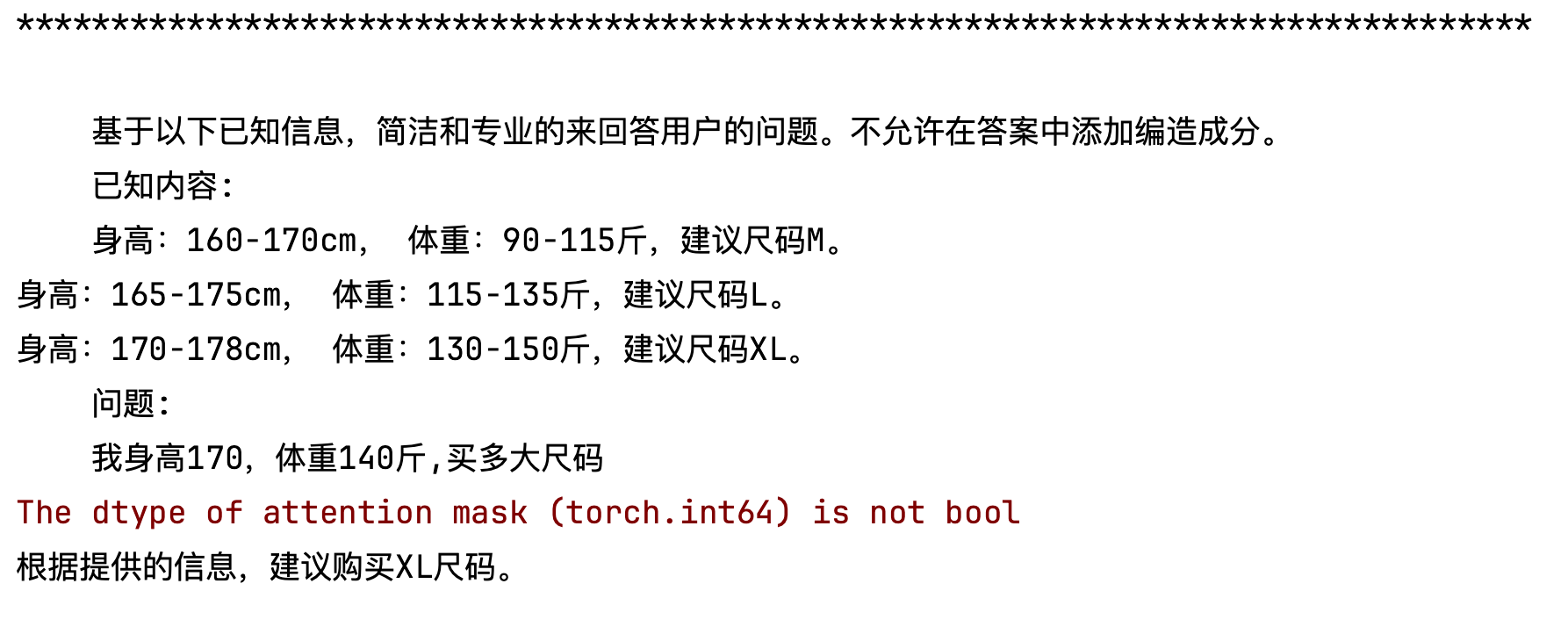
本章节主要介绍了基于LangChain+ChatGLM-6B模型实现本地知识库的问答实现原理+过程。